
Good digital signage templates save you from two problems: a blank screen, and a screen that looks like a stretched flyer. This list covers nine places to get templates built for screens, what each one does well, and a short checklist for choosing between them.
We start with HootBoard because the template library is built into the product. The other eight are tools we see customers use alongside it, listed as they stand today.
1) HootBoard Flyer Templates
Best for: teams who post to a board or kiosk every week and want each post to look designed.
- Several hundred templates, grouped by what you are posting: Announcement, Event, Deal, Job, Story, Question, Achievement and News
- Seasonal and big-event themes so a board stays current week to week
- Every template in portrait and landscape, so it fits a kiosk or a wall screen
- Publishes straight to the board; nothing to export or re-upload

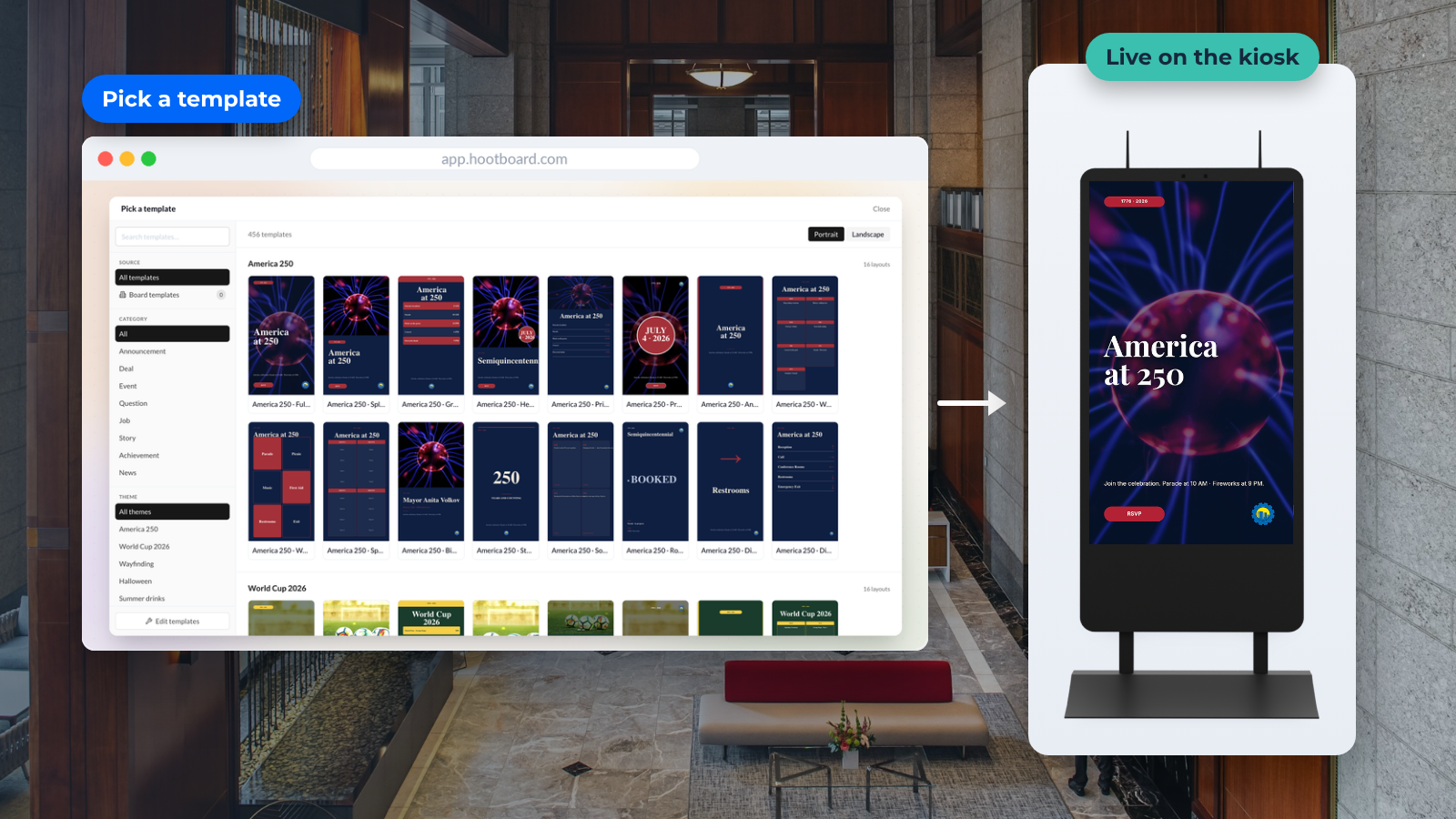
The library opens from the post creator with a Design from template option. Pick a layout and you are in a simple editor: change the text, swap elements, upload your own photos or use the built-in stock images. Layers can be rearranged without breaking the design.
The time-saver is Apply brand. One click drops your logo and brand colors into the template, so every post stays on brand. Save anything worth reusing as a board template.

Because HootBoard is interactive, a template is not the end of the story. The same post can carry a QR code so a visitor takes the flyer with them, show up in the Events app, and appear on the board's public web link. Read more in Flyer Templates: from quick posts to designed flyers.
See HootBoard's templates on your own board
2) Yodeck
Best for: quick, standard signage layouts for menus, price lists and notices.
- Templates you can edit in the browser
- Supports images, video and social feeds
Yodeck is signage software first, so its templates are sized for screens and publish directly to its players. The layouts are practical rather than showy, which suits lobbies and break rooms.
See the Yodeck template gallery.
3) Canva
Best for: anyone who already designs in Canva and wants matching screen content.
- Drag-and-drop editor with a very large template library
- Stock photos and brand kits included
Canva is the easiest general design tool to learn. Search "digital signage" or set a custom 1920x1080 or 1080x1920 canvas, then export an image or video for your signage player. The trade-off: Canva does not publish to a screen, so you need a separate signage system to show the result.
Start with Canva's bulletin board templates.
4) Anthias (formerly Screenly OSE)
Best for: technical teams who want an open-source player on a Raspberry Pi.
Anthias is the open-source edition of Screenly. There is no template library in the Canva sense; you build web pages or images and schedule them. It is the most hands-on option here and the most flexible if you can code.
5) Adobe Express (formerly Adobe Spark)
Best for: polished graphics with Adobe stock and fonts.
Adobe Express has a wide set of social and poster templates that resize to screen formats. It is a design tool, not a signage tool, so you export the result and upload it to your player.
6) PosterMyWall
Best for: promotional posters and event flyers.
PosterMyWall specializes in marketing templates with strong, bold layouts. Many designs are available without a subscription, and it offers sizes made for digital displays.
7) VistaCreate (formerly Crello)
Best for: visual content with animation.
VistaCreate works like Canva, with a focus on animated designs and video. Animated posts hold attention on a screen better than static ones, which is where this tool earns a place.
8) Piktochart
Best for: information-dense content like charts and step-by-step guides.
Piktochart started as an infographic tool. Its templates suit campuses and offices that need to explain something on screen, such as a process, a timeline or a set of numbers.
9) Visme
Best for: presentations and data-led boards.
Visme blends presentation and infographic templates. It is a good fit when the screen content is a slide deck or a dashboard-style summary rather than a flyer.
Comparison at a glance
Here is how the nine tools compare.
Design and cost
Tool | Screen sizes | Brand kit | No-cost plan |
|---|---|---|---|
HootBoard | Built in | Yes | Yes |
Yodeck | Built in | Some | Basic |
Canva | Custom | Yes | Yes |
Anthias | Built in | No | Open source |
Adobe Express | Custom | Yes | Yes |
PosterMyWall | Built in | Some | Yes |
VistaCreate | Custom | Yes | Yes |
Piktochart | Custom | Yes | Yes |
Visme | Custom | Yes | Yes |
Publishing and interaction
Tool | Publishes to the screen | Interactive on the screen |
|---|---|---|
HootBoard | Yes | Yes (QR codes, apps) |
Yodeck | Yes | No |
Canva | No | No |
Anthias | Own player | No |
Adobe Express | No | No |
PosterMyWall | Some | No |
VistaCreate | No | No |
Piktochart | No | No |
Visme | No | No |

How to pick a digital signage template
Five things to check before you commit to a template source:
- Screen format. Kiosks are portrait; wall screens are landscape. Pick a library that offers both, or you will crop every design twice.
- Where it publishes. A design tool stops at an image file. A signage platform puts the design on the screen. The fewer steps, the more often staff will update content.
- Brand controls. Logo and colors applied once, not pasted by hand every time.
- Readability at distance. Large type, high contrast, one message per screen. A template that looks good on a laptop can be hard to read from ten feet away.
- Interaction. If a visitor can tap the screen or scan a code, the template should lead somewhere: an event page, a map, directions sent to their phone.
If you want templates and the screen in one place, start a HootBoard board. The template library, Screen Playlists and the kiosk apps all come with it. See how it fits with our kiosk software.
Create your board and open the template library
FAQ
What size should a digital signage template be?
Use 1920x1080 for landscape screens and 1080x1920 for portrait kiosks. Keep text inside a safe margin of about 5 percent on each side.
Are there free digital signage templates I can use commercially?
Yes. HootBoard's Flyer Templates are included with any board, including the always-free Launch plan. Canva, Adobe Express and VistaCreate also allow commercial use of their no-cost templates; check each tool's license for stock images.
Can I use a Canva design on a HootBoard kiosk?
Yes. Export the design as an image or video and post it to your board, or add it to a Screen Playlist.
What is the difference between a signage template and a flyer template?
A flyer template is sized for print and read up close. A signage template is sized for a screen, uses larger type, and often includes a QR code or a tap target so the viewer can act on it.
Do I need design skills to use these templates?
No. All nine tools are built for non-designers. The main skill is restraint: one message, one image and one call to action per screen.