
Let Visitors Create and Share Branded Memories with a Tap
Transform your kiosk into a magnet for engagement. With the HootBoard Selfie App, guests can capture, customize, and share unforgettable moments while amplifying your brand in every photo.
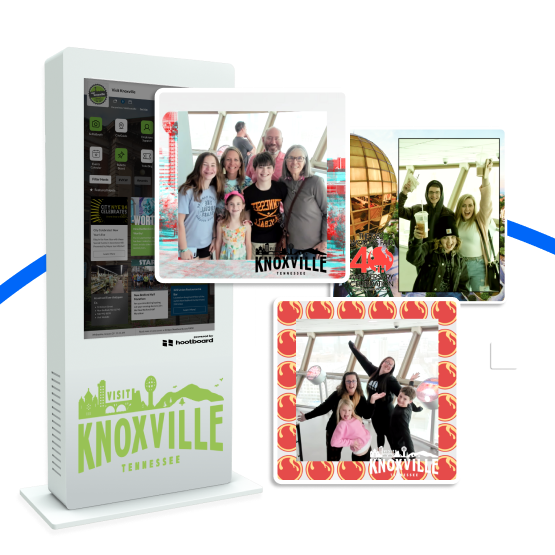
More Than a Mirror — It’s a Branded Experience Engine
The Selfie App is a fully interactive experience designed to bring people closer to your brand through fun, memorable moments.
Branded Photos
Overlay your logo, location theme, or event branding directly on each photo.
Touch to Capture
Intuitive on-screen countdown and camera trigger for easy snaps.
Filters & Frames
Add personality with fun overlays and stickers your visitors will love.
QR Code Access
Let users instantly scan and download their photos — no login or app needed.
Moderation Tools
Choose between automatic publishing or admin-reviewed content for brand safety.
Live Photo Wall
Display selfies on a scrolling screen to entertain and attract others.
Launch It Fast. Control It With Ease.
You don’t need a tech team to run a selfie station.
One-Click Activation
Add the Selfie App from your dashboard in seconds and assign it to specific kiosks.
Upload Custom Frames
Create and upload branded photo overlays for events, holidays, or audiences — refreshable anytime.
Flexible Moderation
Auto-publish selfies or manually approve each image from the dashboard.
Instant QR Sharing + Wall Display
Guests scan and download instantly; approved selfies can loop on kiosks to draw more participants.
Access All Photos Anytime
Every selfie is stored securely in your media library for internal use or social repurposing.
You Asked. We Answered.
Here are some of the most common queries we hear from customers.
What is the HootBoard Selfie App?
An interactive feature that lets visitors take branded selfies directly from the kiosk — a fun, shareable experience that promotes your location or brand.
How does the Selfie App work on a kiosk?
Visitors tap the app, pose, and receive a branded selfie with your logo, frame, or message, which they can send to themselves or share online.
Can users share their selfies on social media?
Yes. After taking a selfie, users can email it to themselves with a shareable link to post on Instagram, Facebook, or X.
Is the selfie image branded with our logo or message?
Absolutely. Add custom overlays, logos, location tags, event names, or hashtags to each photo.
Where is the Selfie App most useful?
Visitor centers, tourism kiosks, events, hotels, campuses — anywhere you want a memorable, photo-worthy moment.
Does the Selfie App collect visitor emails or data?
When users choose to email the photo to themselves, you can optionally capture email addresses (with consent) for follow-ups.
Can we review or download the selfies taken on our kiosks?
Yes. All submissions can be reviewed and downloaded by admins from your dashboard.
Is the Selfie App included with HootBoard or is it extra?
It’s part of the HootBoard OS feature set — enable it on any kiosk running our platform, no separate license needed.
Does it require a camera-enabled kiosk to work?
Yes. Your kiosk must include a front-facing camera, which is typically built-in on most models we support.
How do we try out or activate the Selfie App?
Schedule a demo to see the Selfie App in action and learn how to enable it for your location.
Capture Attention. Build Brand Love. Boost Engagement.
Add the HootBoard Selfie App to your kiosk and turn your space into a social-ready photo zone.