
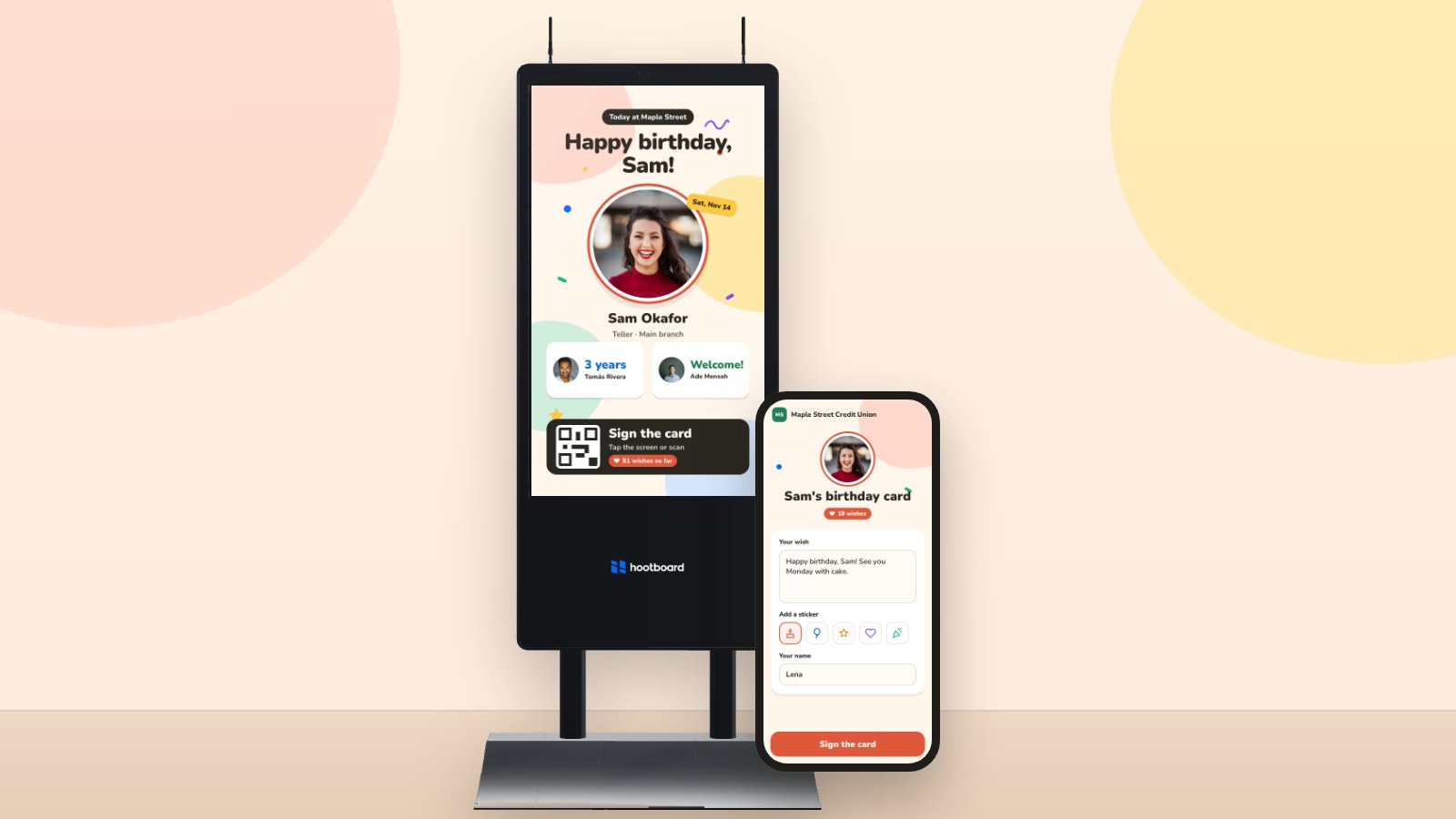
Celebrations is a brand new HootBoard app. It puts birthdays, work anniversaries and welcomes for new people right on your Screens, with a card everyone can sign on the kiosk or from their phone.
Every place has its people. The teller who knows every regular by name. The nurse who has worked nights for ten years. The new hire on their very first Monday. The resident turning 90 this week.
Those moments deserve a little fuss, and they're easy to miss when the only record is a spreadsheet on someone's desk. So we built Celebrations: a new app that remembers the big days for you, shows them on your Screens and lets everyone join in.
Three reasons to celebrate
- Birthdays. Just the month and day. Nobody is asked for a birth year, and ages are never shown.
- Years with us. Cheer every work anniversary, or only the milestones: 1, 5, 10, 15, 20 and 25 years and up.
- Welcomes. New people get a warm hello on your Screens for their first few working days (five, unless you pick another number).
A big moment on every Screen
On a day with something to celebrate, a Celebrations slide joins your attract loop: a big "Happy birthday, Sam!" with their photo front and center, a shout-out for anyone marking years with you, and a welcome for anyone new. On quiet days it simply steps aside, so your loop never shows an empty card.
Celebrations can also post a hoot on your board for each person, so everyone following along on the web and on their phones sees it too. The hoot tidies itself away at midnight.
Birthday on a Saturday? Choose to celebrate on the Friday before, the Monday after or On the day, so nobody's big day slips by while the building is empty.
Sign the card, together
Every celebration comes with a card, just like the one that used to go around the office. Tap the kiosk, pick a quick message like "Happy birthday!" or "Cake time!" (or write your own), add your name if you like, and sign.
Rather type on your phone? Scan the QR code on the slide and sign from there, with a sticker for good measure. No app to download and no account needed.

At the end of the day (5 PM by default), the guest of honor gets the whole card by email from your board, with every wish from the kiosk and from phones. Prefer to read wishes before they appear? Set new wishes to I check them first and they'll wait for your okay.
Birthdays people choose to share
A birthday is personal, so Celebrations treats it that way:
- People choose. A birthday shows on your Screens once the person says yes, from your invite link or a quick prompt on your board. Birthdays imported from a spreadsheet or HR system stay private until then.
- No year, ever. We keep the month and day, and that's it.
- Screens see only the next 7 days. A kiosk gets just enough to show this week's celebrations, even if it goes offline for a bit.
- Moving on is gentle. When someone leaves, mark them as left and they quietly drop off every Screen.

Bring your people in, your way
Celebrations starts from People, one shared list of the people at your place. Fill it however suits you:
- Spreadsheet. Upload a CSV or Excel file. We match your columns for you and show a preview before anything is saved.
- Invite link. Share a link, or print a poster with a QR code. People confirm their email with a quick code and add their own birthday.
- Board members. Bring in the people who already have accounts on your board, picked by role.
- BambooHR. Connect it once, and start dates, birthdays, departments and locations stay in sync on their own.
Google Workspace, Microsoft 365, Gusto and Rippling are coming soon.
And it isn't only for offices. People speaks the language of your place: Residents and Staff in senior living, Providers and Volunteers in a hospital, Tenants in an office building, Faculty and Students on campus. Rename groups any time you like, and choose whether to celebrate everyone or just certain groups or departments.
Set it up in a few minutes
- Find Celebrations in the HootBoard App Store and add it to your board.
- Click Open dashboard on the Celebrations app.
- Open Bring in people and pick how to add your people.
- In Settings, choose what to celebrate, what to do about weekends, and whether to post a hoot and email the card.
- Click Save. The next time there's something to celebrate, your Screens will be ready.

The Today and Upcoming pages show who's being celebrated now and who's coming up, so you always have time to order the cake. Questions, or want a hand getting started? Write to us at support@hootboard.com and we'll be happy to help.
The bottom line
The best places to work, live and visit are the ones where people feel noticed. Celebrations makes that easy: a birthday on the big screen, a card full of names, and a welcome that says "we're so glad you're here." Set it up once, and it remembers for you.