
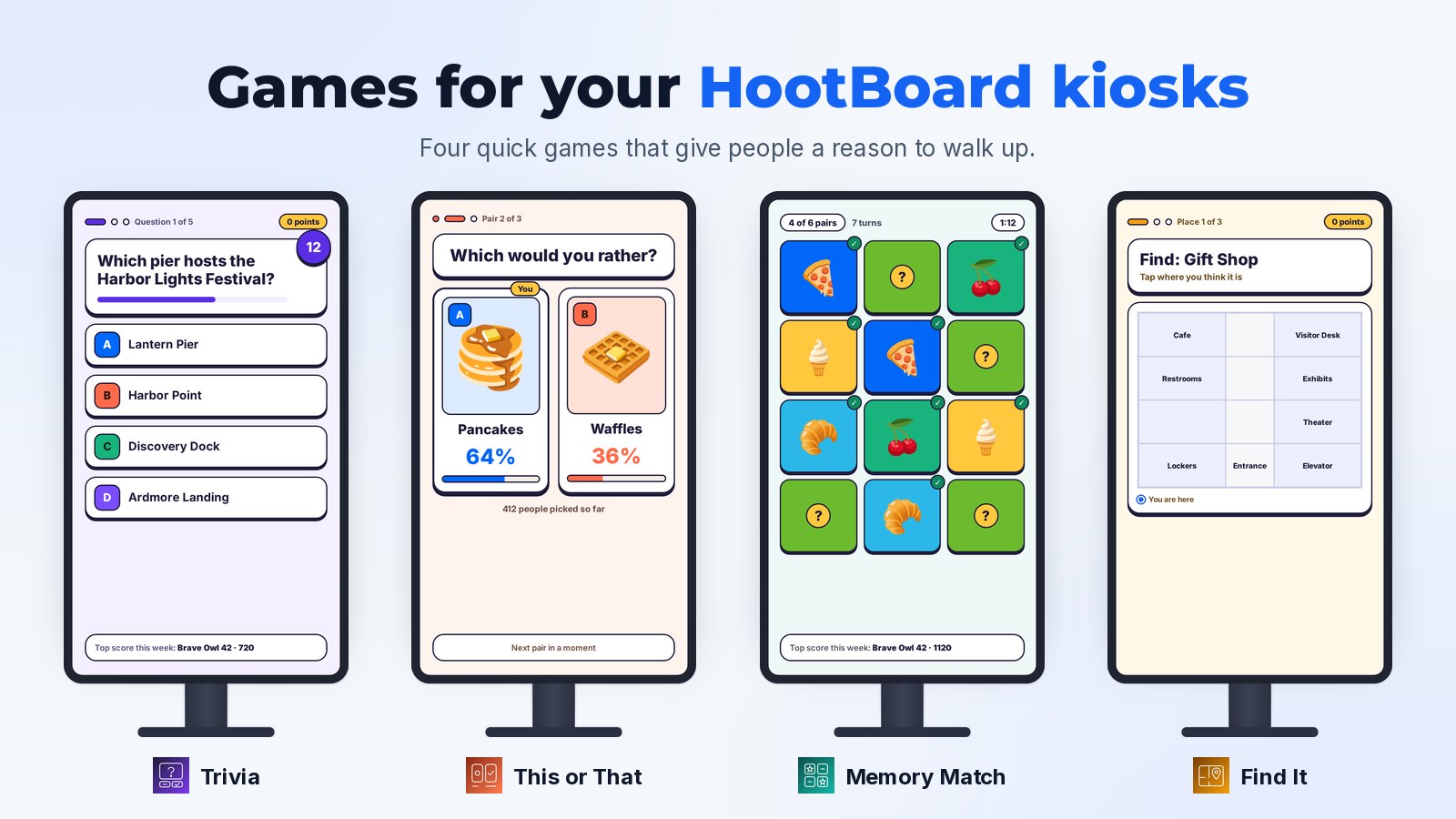
Your HootBoard kiosks can play games now. There are four in the HootBoard App Store today, each one takes a minute to play, and you can add any of them to your board in a few minutes.
A kiosk only helps people once they walk up to it, and plenty of people pass a screen in a lobby without a second look. A game changes that. It's an easy first tap, it's over in a minute or two, and once someone has tapped, they see everything else your kiosk can do.
Here's a quick tour of the games, what they have in common, and how to pick the right one for your place.
Four games, four reasons to walk up
Trivia: a quiz about anything
You choose the subject: your town's history, healthy habits, your company's first product, this month's theme. Each question has up to four answers, each with its own color and letter, and a clock counting down. After every answer the kiosk shows the right one, along with a fun fact if you added one.
Write your questions, bring in hundreds at once from a spreadsheet, or, if you use Business Listings, let Trivia draft some from your listings for you to look over. Read more about Trivia.

This or That: two choices, one tap
Coffee or tea? Pizza or tacos for the team lunch? People tap the one they like and right away see how everyone else picked. Every kiosk on your board adds to the same count, so the numbers move as people play. There are no right answers, which makes it the friendliest game of the four. Read more about This or That.

Memory Match: flip, match, beat the clock
Cards are dealt face down and people flip two at a time to find the pairs before the clock runs out. Everyone already knows how to play, from a five-year-old to a commuter with a minute to spare. Start with one of our ready-made picture sets (Food, Animals or Travel) or upload your own: your landmarks, your products, your mascot. Read more about Memory Match.

Find It: learn your way around
For boards with Wayfinding. The kiosk names a place, like the gift shop or the clerk's office, and people tap where they think it is on your own floor plan. A right tap scores, a quick one scores more, and either way the kiosk shows where it really is. There's nothing to write: places come straight from your map, so the game stays up to date when things move. Read more about Find It.

What every game has in common
All four games are built on the same foundation, so they look and behave the same way on your kiosks:
- Short rounds. A round takes a minute or two, and it's a little different every time.
- Nothing to type, nothing to sign up for. Players just tap Start. No names, emails or accounts.
- Leaderboards that bring people back. In Trivia, Memory Match and Find It, every player gets a friendly name, like Brave Owl 42, and a place on the leaderboard for the day, the week or all time. There's nothing for you to moderate.
- In your attract loop. When nobody is using the kiosk, it shows the top scores, or how people are picking in This or That, as an open invitation to play.
- Everyone gets a turn. After a few rounds in a row, the kiosk makes room for the next person, and Leave game is always one tap away.
- Keeps working offline. If a kiosk loses its connection, people can still play. Their scores join in once it's back online.
- A Results page. See how many rounds were played and what tripped people up, so you know what to tweak.
Which game should you start with?
Any of them works anywhere, but here's where we'd start:
- Towns and visitor centers: Trivia about local history and landmarks, and Memory Match with photos of your favourite spots.
- Hospitals and clinics: Memory Match as a calm distraction in the waiting room, and Find It so patients and families learn where imaging, the pharmacy or the cafe is.
- Workplaces: This or That for the next team lunch or social, and Trivia for a welcome quiz or a safety refresher.
- Campuses and schools: Find It as part of orientation, and This or That for spirit week.
Not sure? Start with Memory Match. Pick a ready-made picture set and you can have a game on your kiosks today without writing a thing.
Add a game in a few minutes
- Open the HootBoard App Store and go to Games.
- Pick a game and add it to your board.
- Click Open dashboard, then New game, and give it a name.
- Add your questions, pairs or pictures (Find It uses your map), and choose how a round plays.
- Click Publish. Your game shows up on your kiosks the next time they refresh.
You can run as many games as you like, and nothing appears on your kiosks until you publish it. The games run on kiosks using the latest version of the HootBoard kiosk app. Want a hand with your first one? Write to us at support@hootboard.com and we'll be happy to help.
The bottom line
A kiosk works best when people have a reason to walk up to it. Games give them one: a quick bit of fun, a score to beat, and a look at everything else your kiosk has to offer. Trivia, This or That, Memory Match and Find It are the first four, and more are on the way.